
ASUS ZenBook S13 UX392FN 13.9-inch NanoEdge Full HD Laptop (Intel i7-8565 Processor, 512GB PCI-e SSD Storage, 16GB Memory, Dedicated Nvidia MX150…
Last updated on March 11, 2026 1:43 pm Details

ASUS ZenBook S13 UX392FN 13.9-inch NanoEdge Full HD Laptop (Intel i7-8565 Processor, 512GB PCI-e SSD Storage, 16GB Memory, Dedicated Nvidia MX150…
£799.00
Description
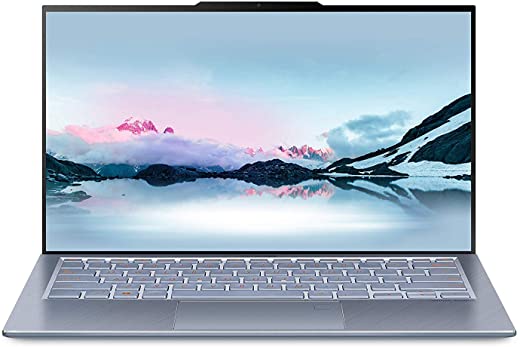
- Four-sided frameless NanoEdge display on ZenBook S13 is a true masterpiece, it features the world’s slimmest bezels, meaning the ZenBook S13 has a 97% Screen to Body ration
- Advantage of slimmer bezels isn’t just visual: they also help reduce the overall size of ZenBook S13. So despite its larger 13.9-inch NanoEdge display, ZenBook S13 actually has a 12.5%-smaller footprint than previous 13.9-inch models
- ‘S’ stands for slim: even with its amazing 13.9-inch display, the new ZenBook S13 is just 12.9 mm thin and weighs a mere 1.1kg, it’s a seriously portable powerhouse that you’ll never need to leave behind, wherever you go
- With ZenBook S13, small size is no obstacle to performance: Powered by Intel’s latest 8th Generation i7 processor and paired with NVidia’s dedicated MX150 Graphics, this is a true powerhouse without compromising its style
- With any ZenBook, your comfort is one of the top priorities, ZenBook S13 goes the extra mile with its exclusive ErgoLift hinge, an engineering masterpiece designed to automatically tilt the keyboard to the most comfortable typing position
Additional information
Specification: ASUS ZenBook S13 UX392FN 13.9-inch NanoEdge Full HD Laptop (Intel i7-8565 Processor, 512GB PCI-e SSD Storage, 16GB Memory, Dedicated Nvidia MX150…
| Platform | ||||||||||||||||||||||||||||||||||||||||||||||||||||||||||||||
|---|---|---|---|---|---|---|---|---|---|---|---|---|---|---|---|---|---|---|---|---|---|---|---|---|---|---|---|---|---|---|---|---|---|---|---|---|---|---|---|---|---|---|---|---|---|---|---|---|---|---|---|---|---|---|---|---|---|---|---|---|---|---|
|
||||||||||||||||||||||||||||||||||||||||||||||||||||||||||||||
| Display | ||||||||||||||||||||||||||||||||||||||||||||||||||||||||||||||
|
||||||||||||||||||||||||||||||||||||||||||||||||||||||||||||||
| General | ||||||||||||||||||||||||||||||||||||||||||||||||||||||||||||||
|
||||||||||||||||||||||||||||||||||||||||||||||||||||||||||||||
| Specification | ||||||||||||||||||||||||||||||||||||||||||||||||||||||||||||||
|
||||||||||||||||||||||||||||||||||||||||||||||||||||||||||||||
Reviews (7)
7 reviews for ASUS ZenBook S13 UX392FN 13.9-inch NanoEdge Full HD Laptop (Intel i7-8565 Processor, 512GB PCI-e SSD Storage, 16GB Memory, Dedicated Nvidia MX150…
Show all
Most Helpful
Highest Rating
Lowest Rating
Add a review
Related Products


K. R. Phillips –
I don’t understand all the negative reviews here, this is an extremely fast Ultrabook, under 2 lbs in weight, beautifully made from solid aluminium. The micro bezel allows them to fit a 14″ screen in a 13″ body and it has a built-in nVidia graphics processor which makes video editing or light gaming on the move effortless. The screen is full HD which is perfectly good enough in a 14″ format and battery life has proven excellent so far. i7 quad core processor, 16GB Ram and a 512 ssd is the perfect spec for power use in a flyweight device.
There are only a few negatives, 1) The built in camera is of only average quality; ok for Skype but a long way from HD. 2) The type C ports are not thunderbolt compatible, but it’s unlikely you’ll use an external graphics card when you have a built-in nVidia. 3) No touch screen, but honestly I don’t ever use them on laptops; It has a large multitouch trackpad which you can scroll and pinch in/out with which is much nicer to use and stops you getting…
Zandria –
I bought on November 2019 that conv-19 lockdown. I have to work at home, only 4 – 6 months laptop start get worse.
Alway have crash, sound funny, wireless internet connection is weak, Camera/video alway fizzy and sometimes black out for no reason also wires connected to other computer is worse black out or fizzy. It is hard to explain technology staff but I recommended you is DO NOT buy any Laptop or technology staff through Amazon, just go stores and it is safe. I am regent to buy it.
L. Darby –
Love the lightness of this plus the wide screen!
Pete –
I had this laptop for about a week but it
Kept freezing, and then the screen started flickering. I did a full reset to try it again but within a couple of hours it froze again. I
Decided to return it after about 7 days on 1st Aug and even thou I am Prime, Amazon’s only choice was to return via Hermes which was handed over to them and signed and accepted on August 1st. 15 days later it is still in status “returning to retailer”
– complained to Amazon yesterday and they said wait until Aug 20th. Totally disgraceful returns process. I’d never trust Amazon with a high value item again.
Amazon Customer –
Quite excited to buy this, but as soon as I booted it up, the screen stayed black. After 3 ASUS in the past, this is quite the disappointment…
CrackedLCD –
Returned within less than a week.
First up, this machine is beautiful to look at… that’s the start and end of the good parts…
Bad? Where to start?
I should have took note from the first hit of the power button. No display. “Fear not” I thought. “It’s probably just because it’s been sitting around in storage”. No signs of abuse, so I booted through Bios and all seemed well on day one.
Day 2 – starting to use it and install my software. CPU appears to run hot. The vents underneath are tiny and the air they do push goes up against the screen and causes more of the unit to warm up… 2 blue screen errors and restarts. Driver updates.
Day 3. More of the same blue screens… notice that after it’s been on an hour or so, audio crackles through the speakers. Updates ASIO drivers… short term fix.
By Day 6, I have lost my rag with blue screens, slow performance and audio crackle. I’m not even asking it to do much. I consider a replacement request but it dawns on me that this design isn’t…
M.MOOSA –
Laptop arrived with a screen burn in, screen was damaged prehand.