
Canon PIXMA TS5151 3-in-1 Printer – White
Last updated on February 19, 2026 6:56 pm Details

Canon PIXMA TS5151 3-in-1 Printer – White
Original price was: £139.68.£82.00Current price is: £82.00.
Description
- Connect to smart devices via range of options including Bluetooth for easy Wi-Fi print and scan via Canon PRINT app
- Experience the freedom to print from social media and scan to the cloud with PIXMA Cloud Link
- Print more pages and save using optional XL FINE ink cartridges and auto 2-sided printing
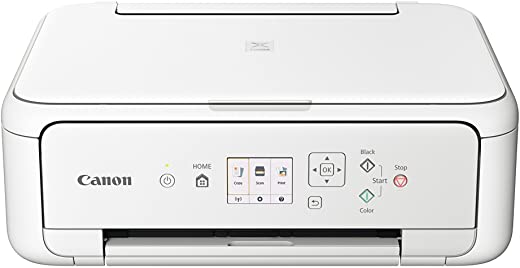
- Control, view and connect with ease using easy access buttons and 6.2 cm colour screen
- Small, stylish and affordable All-In-One for high quality colour printing, copying and scanning at home
Additional information
Specification: Canon PIXMA TS5151 3-in-1 Printer – White
| General | ||||||||||||||||||||||||||
|---|---|---|---|---|---|---|---|---|---|---|---|---|---|---|---|---|---|---|---|---|---|---|---|---|---|---|
|
||||||||||||||||||||||||||
| Specification | ||||||||||||||||||||||||||
|
||||||||||||||||||||||||||
Reviews (8)
8 reviews for Canon PIXMA TS5151 3-in-1 Printer – White
Show all
Most Helpful
Highest Rating
Lowest Rating
Add a review
Related Products


B –
Excellent machine but when using with Apple devices there is no option to have draft printing/grey scale. Even connecting with USB does not override the print setting so the printer is heavy on ink compared to other models. It seems to be the fault of Apple but I believe it could be a combined effort to improve the sale of ink.
NO –
Printer works with wi-fi apparently but I couldn’t get it to work so I bought a usb lead plugged it in and managed to print 3 A4 pages but other features didn’t work. Tried printer yesterday now not working at all even with usb lead.
I have sent to canon 3 complaint emails this just isn’t good enough. I do not use the printer everyday, I want to return it for a refund as it is not fit for purpose. Don’t buy this printer its rubbish don’t waste your money
Mr. FD Hall –
This dam printer keeps recognizing letter sized paper and not a4…. IT THEN WONT PRINT! The worst device I’ve ever bought…. noisy, big and cumbersome…. 100 quid wasted… I should have bought HP….
Chazoffthecut –
Love it. Excellent value for money and the print quality is top notch for texts as well as photos. Im a technophobe but still managed to set it up myself. I did get it wrong looking for the exact Canon for set up so I used the disc only to realise that it was 5100 series 😅 😳 😬 🙃
John W –
I needed a new printer. Having read various reviews, I thought this would meet my needs for quality printing at reasonable ink cost. I did not research the ink cost sufficiently. The ink cost is sky high, even remanufactured cartridges. The printer and output is high quality. If you are looking for a good printer at reasonabe cost per page printed, this is not the printer to buy. You’d think you were paying for liquid gold.
carly –
This printer has been a pain in the ….
The set up took AGES. I wanted to throw it at the wall. And when you want to print anything with colour, well go away and make a cup of tea while it prints, maybe cook the dinner too while you’re there ’cause you’ll have plenty of time! Wow it’s slow sometimes! It also gets through ink like an alcoholic with a bottle of white lightening.
I printed some school stuff off for my son… the ink is near gone on the first day of using it.
I, like loads of other unintentional home schooling mums right now, had to get a printer as my other one had broken ages ago. This was one of the only ones left that didn’t cost the same as my house.
Oh how I wish i’d saved my money
David Wild –
This does not have a touch screen, but it does not need it. I was totally familiar with the standard of Canon printing and this does not disappoint. I loved the scanning. There is and option to scan to either pdf or jpg. There is also an option to save scans on the laptop, which I loved.
Mr. S. R. Phillips –
I only usually go out of my way to leave reviews when a product is either really good or really bad, and this printer has surprised me enough to be worthy of a great review; here’s why.
I’m barely a novice when it comes to setting things up from flat pack to – printers! This is a Christmas (2018) gift for my 14yr old daughter for her ChromeBook. Now I haven’t bought a wifi printer before, and certinaly never set up a Chromebook printer previously, and annoyingly, there isn’t much help on the internet!
Anyway, within mere minutes of switching on the printer, and going to the WPS setup option, pressing the WPS button on the wifi router, it was all done!!! Then after switching on the Chromebook, going to print settings, there it was, all ready to print! Genius!!! The advantage of this printer over some other Wifi printers, is the size and versatility of the LCD screen. This means you have control over what type of setup you want, Direct, Canon App, Google Cloud, or Bluetooth etc. Defo…