
Samsung LU28R550UQUXEN 28″ UR55 4K UHD Monitor – Ultra HD 3840 x 2160, HDR10+, Freesync, 2 x HDMI, Displayport, Dark Grey
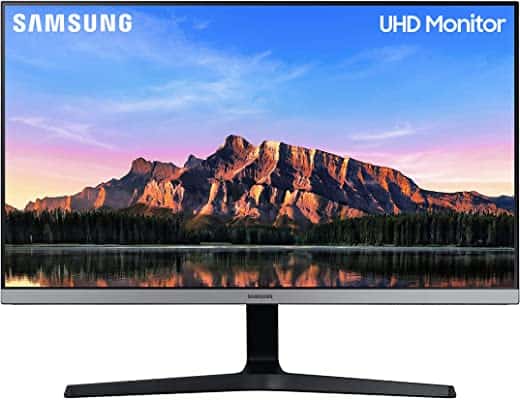
Last updated on January 10, 2026 7:19 am Details

Samsung LU28R550UQUXEN 28″ UR55 4K UHD Monitor – Ultra HD 3840 x 2160, HDR10+, Freesync, 2 x HDMI, Displayport, Dark Grey
£179.00
Description
- 28″ 4K Ultra HD (3840 x 2160) computer monitor for stunning images with lifelike details
- Color vividness and clarity across every inch of the screen with IPS Panel
- Experience dynamic range of luminous blacks and whites for memorable picture quality via powered by HDR10+
- 3 sided frameless bezel with sophisticated design
- AMD Radeon FreeSync & multiple game modes – responsive game experience without screen tearing. Optimal color settings and image contrast for more vivid scenes
- Multiple connectivity option available through 2 HDMI and Display port
Additional information
Specification: Samsung LU28R550UQUXEN 28″ UR55 4K UHD Monitor – Ultra HD 3840 x 2160, HDR10+, Freesync, 2 x HDMI, Displayport, Dark Grey
| Display | ||||||||||||||||||||
|---|---|---|---|---|---|---|---|---|---|---|---|---|---|---|---|---|---|---|---|---|
|
||||||||||||||||||||
| General | ||||||||||||||||||||
|
||||||||||||||||||||
| Specification | ||||||||||||||||||||
|
||||||||||||||||||||
Reviews (6)
6 reviews for Samsung LU28R550UQUXEN 28″ UR55 4K UHD Monitor – Ultra HD 3840 x 2160, HDR10+, Freesync, 2 x HDMI, Displayport, Dark Grey
Show all
Most Helpful
Highest Rating
Lowest Rating
Add a review
Related Products


Amam –
This is a great entry level 4k display that everyone can be proud of.
I do have one big gripe with this monitor which I wish I knew before; The screw mount holes at the back are way too high. Like, why? It’s a massive let down for me because I have multiple monitors which have all had their mounts in the middle. Yet this one is so high that when I mount it, it scrapes across my desk if I move it.
I’ve tried finding a way to flip the monitor upside down which yes, it does work. But it doesn’t feel safe as the backing starts to slightly bend, plus there’s no way to rotate the image of my input such as when I’m using my Playstation.
Ade –
Only problems are the annoying location of the settings control on the back and the blue power light remaining on after shutting down my PC – would a simple on/off switch have really hurt you Samsung?
One of the HDMIs does 4k at 60Hz the other is only 30Hz.
Before you go and buy a display port cable – as I did – save your money as Samsung generously include a display port and HDMI cable in the box
Picture is fine for my purposes just now baut haven’t tested it with demanding games yet or by editing my 4k videos.
The OGs –
Initial impressions were good – it’s a well designed monitor, good size and seemingly good quality finish. I generally had good impressions of Samsung. Where it failed was when I turned it on. The vertical viewing angle is so narrow the colours changed all over the screen. Because the screen is so large and stand short, you’re looking down on it and the narrow viewing angle therefore meant everything was so washed out as to be unpleasant. I tried having max contrast and low brightness and the other settings but it didn’t improve much. Despite the resolution two text documents next to each other were not clear enough to be usable over hours. Another strange point is that when night view was turned on, black text on the screen had a white outline which looked a mess. Unfortunately I had to return it and will look to another brand.
Claire –
I ordered this as a second screen. It runs off my Mac Book Pro with a HDMI cable. We also have a Thunderbolt to compare it to and the graphics are clearer plus Apple no longer sell the Thunderbolt….shooting themselves in the foot there but hey ho. The screen is used for graphic design and web design so picture quality is paramount.
Stu –
I found some of the other comments confusing as at the time of purchase, the same reviews appear for different models (28in and 30in, Bezelless or Flat). They are different monitors with different specs. Mixing the reviews is very inaccurate.
Here’s my review for the 28inch Bezelless UR55 model:
I bought this to use with my MacBook Pro 13inch early 2015. It works great, the colours are vibrant and sharp right to the edges. The stand is strong and can be tilted, but not raised or lowered.
I do have 2 very minor points I wanted to share with you:
1. No DP cable is included in the package (only HDMI cable).
2. The whites are a tiny bit duller when I compare against my MacBook Screen at full brightness. But really, it’s not a problem for me.
With the MacBook Pro model I have, the HDMI cable can achieve full 4k at 30Hz on both HDMI ports. The DP port can achieve full 4k at 60Hz. I bought a mini DP to full DP cable (cost around 10 pounds) and now getting 4k at 60Hz. Videos play nice and…
DVDER –
I bought this for my son, who is both an avid gamer and video editor. Given the sophistication of his editing (uses Adobe Creative Cloud), he needed a 4K screen to move into 4K editing, with good response time for gaming.
So far, he tells me this is great for both. Maybe there is a little halo effect from moving up to 4K for the first time, but he is notoriously picky about equipment, food…and just about everything, so this is praise indeed. And while I was never convinced by the whole curved-TV phase that came and went, for more up close work, the gentle curve makes for a immersive experience used as a monitor.
Set up is straightforward, but do beware of playing with the various international adaptors that come with the PSU: once on, they lock and cannot be removed (well, not easily). After some tense moments (both emotionally and physically, through trying to prise the damn EU adaptor off), I managed to rectify my mistake with only superficial scratches to the PSU. Ater that, it…